Linear Regression V


Grayson White

Stat 243
Week 4 | Fall 2026

Goals for today (and next time)

Today:

  • Linear regression Wrap-up
    • Curved relationships
    • Variable transformations
    • Model selection

Wednesday:

  • Cross Validation

Announcements

  • Quiz 1 return
  • Office hours

Linear Regression Wrap-Up

Linear Regression

Model Form:

\[ \begin{align} y &= \beta_o + \beta_1 x_1 + \beta_2 x_2 + \cdots + \beta_p x_p + \epsilon \end{align} \]

Linear regression is a flexible class of models that allow for:

  • Both quantitative and categorical explanatory variables.

  • Multiple explanatory variables.

  • Curved relationships between the response variable and the explanatory variable.

  • BUT the response variable is quantitative.

More time with the palmerpenguins!

Recap: Regression with the penguins so far

One Quantitative Variable

library(palmerpenguins)
library(moderndive)
mod <- lm(bill_length_mm ~ bill_depth_mm, data = penguins)

get_regression_table(mod)
# A tibble: 2 × 7
  term          estimate std_error statistic p_value lower_ci upper_ci
  <chr>            <dbl>     <dbl>     <dbl>   <dbl>    <dbl>    <dbl>
1 intercept        55.1      2.52      21.9        0   50.1     60.0  
2 bill_depth_mm    -0.65     0.146     -4.46       0   -0.936   -0.363

Recap: Regression with the penguins so far

One Categorical Variable

library(palmerpenguins)
library(moderndive)
mod <- lm(bill_length_mm ~ species, data = penguins)

get_regression_table(mod)
# A tibble: 3 × 7
  term               estimate std_error statistic p_value lower_ci upper_ci
  <chr>                 <dbl>     <dbl>     <dbl>   <dbl>    <dbl>    <dbl>
1 intercept             38.8      0.241     161.        0    38.3     39.3 
2 species: Chinstrap    10.0      0.432      23.2       0     9.19    10.9 
3 species: Gentoo        8.71     0.36       24.2       0     8.01     9.42
  • Estimated regression line for \(x_2 = 1\):


  • Estimated regression line for \(x_2 = 0\):

Recap: Regression with the penguins so far

Equal Slopes Model

library(palmerpenguins)
library(moderndive)
mod <- lm(bill_length_mm ~ species + bill_depth_mm, data = penguins)

get_regression_table(mod)
# A tibble: 4 × 7
  term               estimate std_error statistic p_value lower_ci upper_ci
  <chr>                 <dbl>     <dbl>     <dbl>   <dbl>    <dbl>    <dbl>
1 intercept             13.2      2.25       5.88       0     8.80    17.6 
2 species: Chinstrap     9.94     0.368     27.0        0     9.22    10.7 
3 species: Gentoo       13.4      0.512     26.2        0    12.4     14.4 
4 bill_depth_mm          1.39     0.122     11.4        0     1.15     1.63
  • Estimated regression line for \(x_2 = 1\):


  • Estimated regression line for \(x_2 = 0\):

Recap: Regression with the penguins so far

Different Slopes Model

library(palmerpenguins)
library(moderndive)
mod <- lm(bill_length_mm ~ species*bill_depth_mm, data = penguins)

get_regression_table(mod)
# A tibble: 6 × 7
  term                    estimate std_error statistic p_value lower_ci upper_ci
  <chr>                      <dbl>     <dbl>     <dbl>   <dbl>    <dbl>    <dbl>
1 intercept                 23.1       3.02       7.65   0       17.1      29.0 
2 species: Chinstrap        -9.64      5.72      -1.69   0.093  -20.9       1.60
3 species: Gentoo           -5.84      4.54      -1.29   0.199  -14.8       3.08
4 bill_depth_mm              0.857     0.164      5.22   0        0.534     1.18
5 species: Chinstrap:bil…    1.06      0.31       3.44   0.001    0.455     1.68
6 species: Gentoo:bill_d…    1.16      0.279      4.17   0        0.615     1.71
  • Estimated regression line for \(x_2 = 1\):


  • Estimated regression line for \(x_2 = 0\):

This time: Regression with multiple quantitative predictors
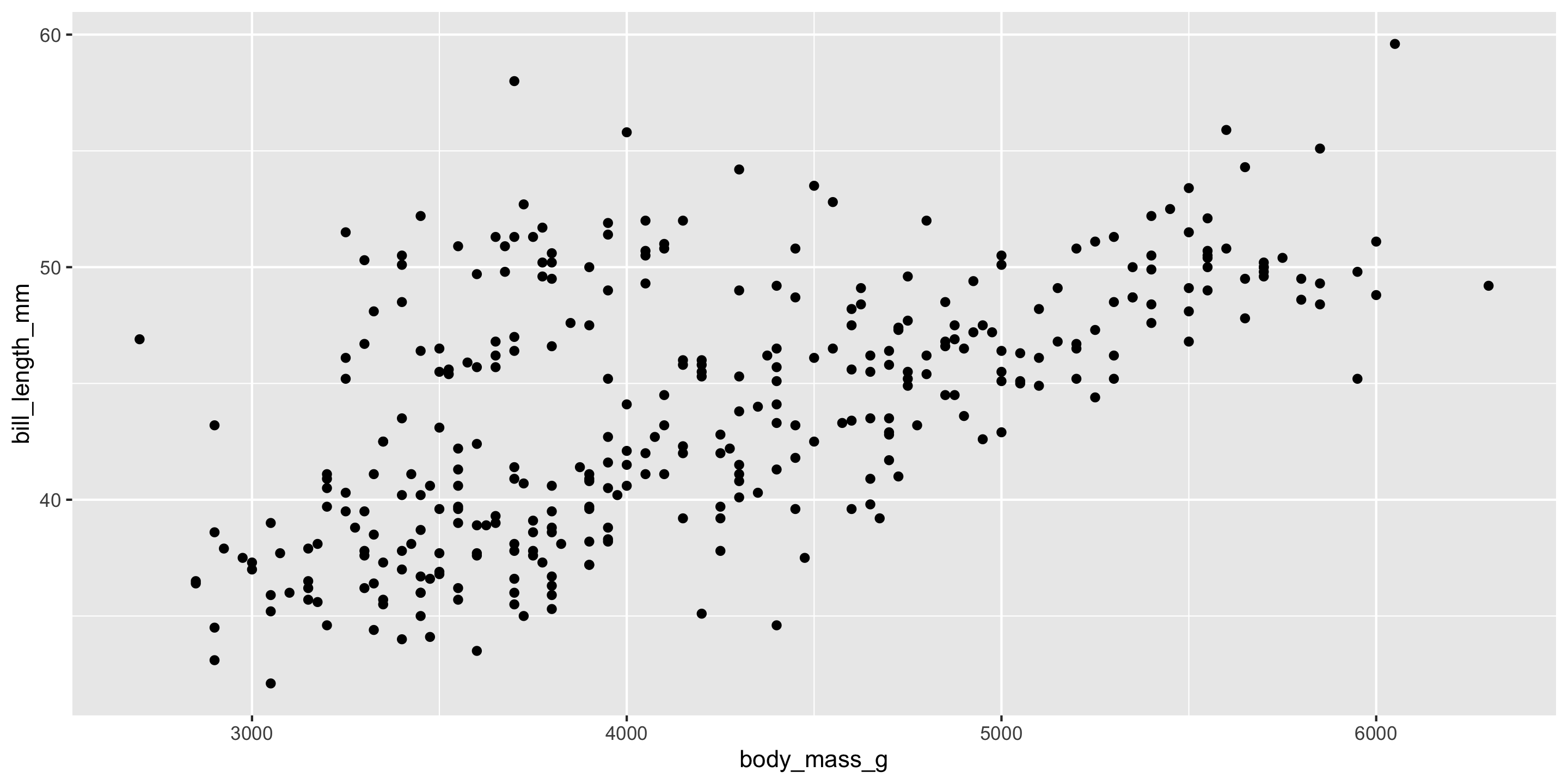
ggplot(penguins, aes(x = body_mass_g, y = bill_length_mm)) +
  geom_point()

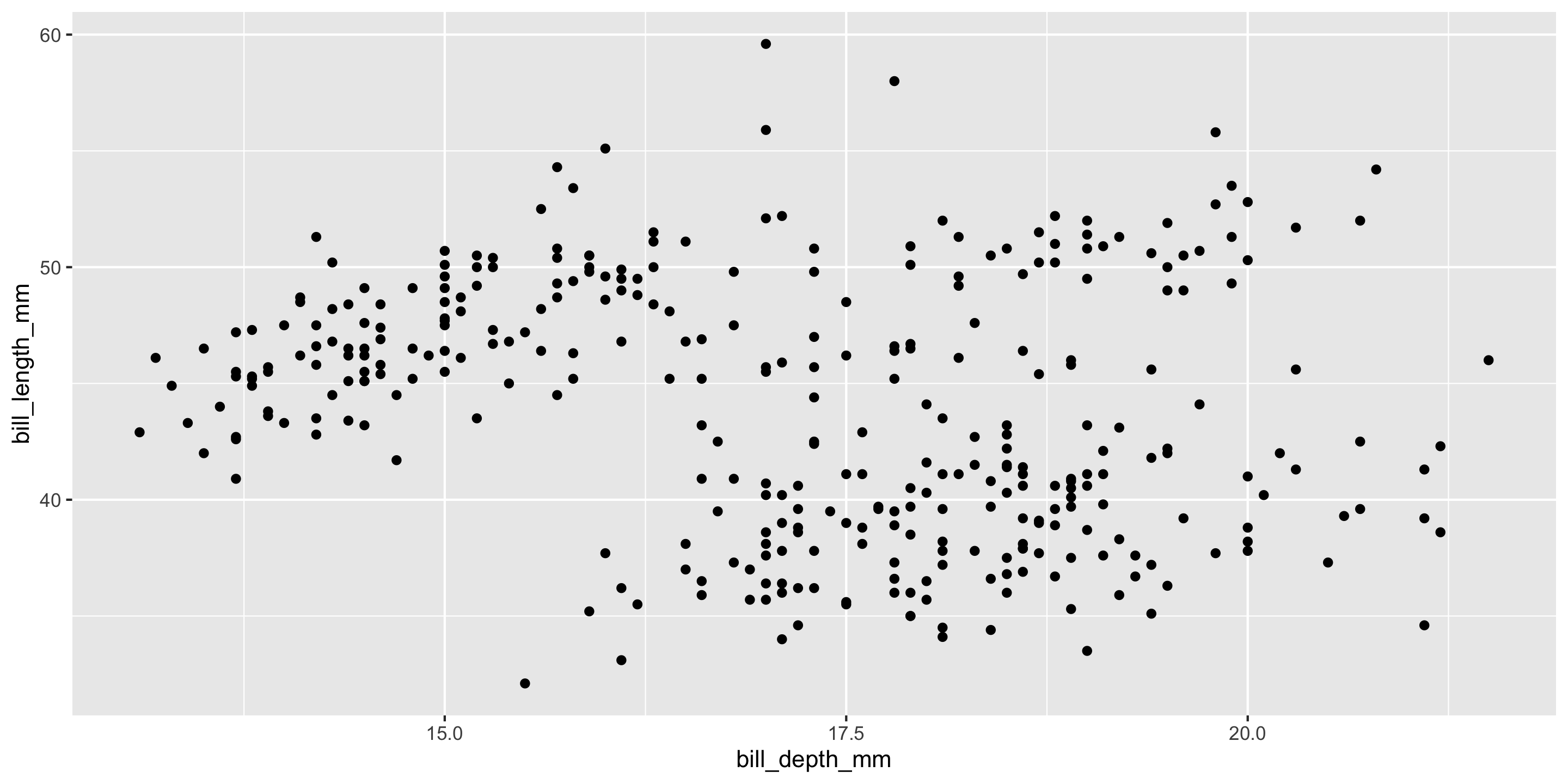
ggplot(penguins, aes(x = bill_depth_mm, y = bill_length_mm)) +
  geom_point()

\[ y = \beta_o + \beta_1x_{\textrm{Bill Depth}} + \beta_2 x_{\textrm{Body Mass}} + \epsilon \]

This time: Regression with multiple quantitative predictors
In R:

mod <- lm(bill_length_mm ~ bill_depth_mm + body_mass_g, penguins)
get_regression_table(mod)
# A tibble: 3 × 7
  term          estimate std_error statistic p_value lower_ci upper_ci
  <chr>            <dbl>     <dbl>     <dbl>   <dbl>    <dbl>    <dbl>
1 intercept       23.3       3.27       7.14   0       16.9     29.7  
2 bill_depth_mm    0.163     0.137      1.19   0.234   -0.106    0.432
3 body_mass_g      0.004     0         12.6    0        0.004    0.005

Visualizing the best fit plane

options(rgl.useNULL = TRUE)
options(rgl.printRglwidget = TRUE)
library(rgl)
plot3d(x = penguins$bill_depth_mm, y = penguins$body_mass_g, 
       z = penguins$bill_length_mm, type = "s", col = "goldenrod", size = 1)
planes3d(a = coef(mod)[2], b = coef(mod)[3], c=-1, d = coef(mod)[1], alpha = .5)

Least Squares and Prediction

  • Still minimizing the sum of squared residuals (from the plane)
  • Still predict like usual
pred_dat <- data.frame(bill_depth_mm = c(16, 18),
                       body_mass_g = c(4000, 5000))
predict(mod, pred_dat)
       1        2 
42.87888 47.44527 

Switching gears: handling curved relationships

New data context: movie ratings

library(tidyverse)
movies <- read_csv("https://www.lock5stat.com/datasets2e/HollywoodMovies.csv")

# Restrict our attention to dramas, horrors, and actions
movies2 <- movies %>%
  filter(Genre %in% c("Drama", "Horror", "Action")) %>%
  drop_na(Genre, AudienceScore, RottenTomatoes)
glimpse(movies2)
Rows: 313
Columns: 16
$ Movie            <chr> "Spider-Man 3", "Transformers", "Pirates of the Carib…
$ LeadStudio       <chr> "Sony", "Paramount", "Disney", "Warner Bros", "Warner…
$ RottenTomatoes   <dbl> 61, 57, 45, 60, 20, 79, 35, 28, 41, 71, 95, 42, 18, 2…
$ AudienceScore    <dbl> 54, 89, 74, 90, 68, 86, 55, 56, 81, 52, 84, 55, 70, 6…
$ Story            <chr> "Metamorphosis", "Monster Force", "Rescue", "Sacrific…
$ Genre            <chr> "Action", "Action", "Action", "Action", "Action", "Ac…
$ TheatersOpenWeek <dbl> 4252, 4011, 4362, 3103, 3778, 3408, 3959, 3619, 2911,…
$ OpeningWeekend   <dbl> 151.1, 70.5, 114.7, 70.9, 49.1, 33.4, 58.0, 45.3, 19.…
$ BOAvgOpenWeekend <dbl> 35540, 17577, 26302, 22844, 12996, 9791, 14663, 12541…
$ DomesticGross    <dbl> 336.53, 319.25, 309.42, 210.61, 140.13, 134.53, 131.9…
$ ForeignGross     <dbl> 554.34, 390.46, 654.00, 245.45, 117.90, 249.00, 157.1…
$ WorldGross       <dbl> 890.87, 709.71, 963.42, 456.07, 258.02, 383.53, 289.0…
$ Budget           <dbl> 258.0, 150.0, 300.0, 65.0, 140.0, 110.0, 130.0, 110.0…
$ Profitability    <dbl> 345.30, 473.14, 321.14, 701.64, 184.30, 348.66, 222.3…
$ OpenProfit       <dbl> 58.57, 47.00, 38.23, 109.08, 35.07, 30.36, 44.62, 41.…
$ Year             <dbl> 2007, 2007, 2007, 2007, 2007, 2007, 2007, 2007, 2007,…

Response variable:

Explanatory variables:

Exploring the Data

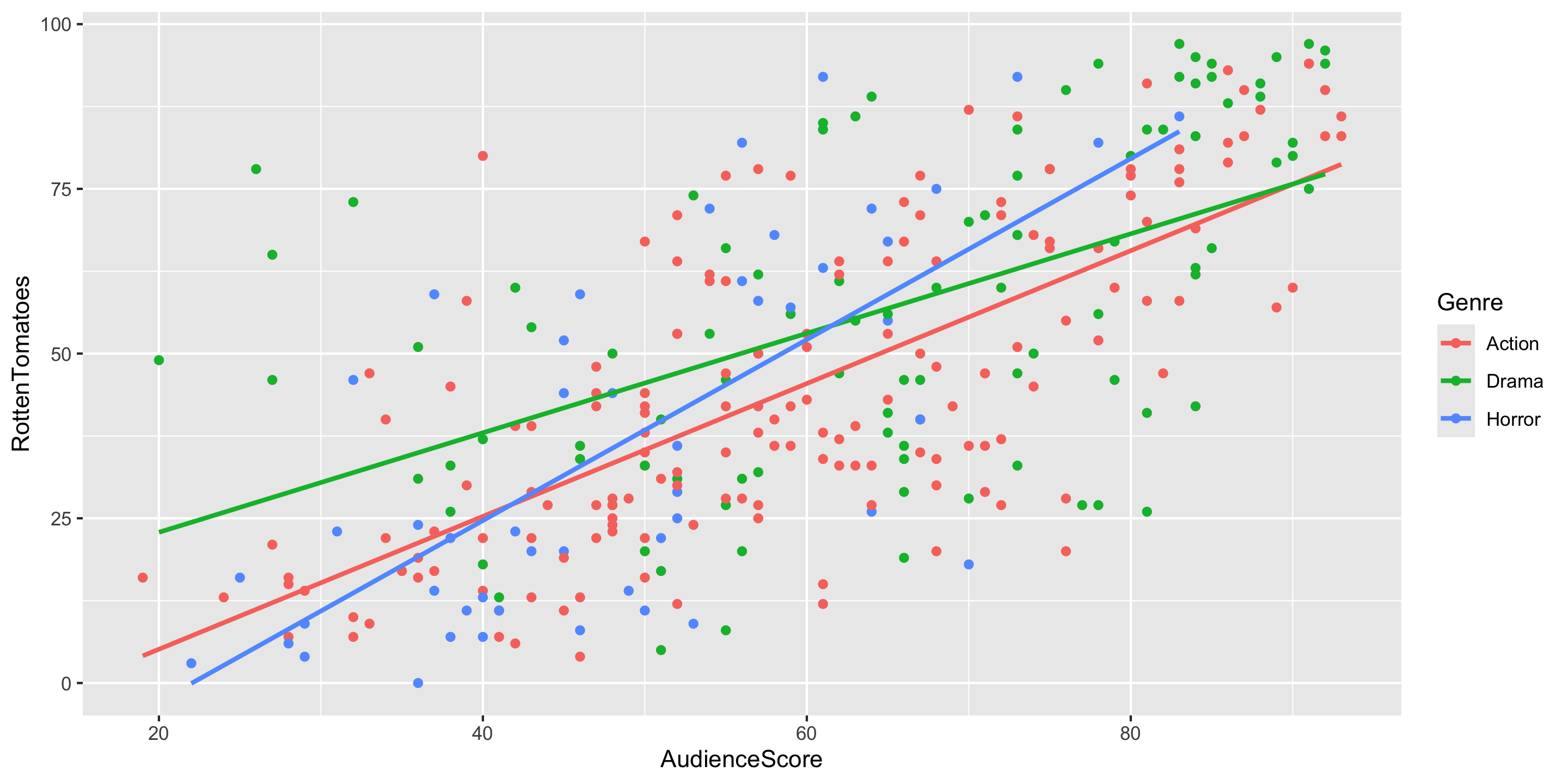
ggplot(data = movies2,
       mapping = aes(x = AudienceScore,
                     y = RottenTomatoes,
                     color = Genre)) +
  geom_point() +
  geom_smooth(method = "lm", se = FALSE) 

  • Trends?

  • Should we include interaction terms in the model?

Building the Model:

Full model form:

mod <- lm(RottenTomatoes ~ AudienceScore*Genre, data = movies2)

library(moderndive)
get_regression_table(mod) 
# A tibble: 6 × 7
  term                    estimate std_error statistic p_value lower_ci upper_ci
  <chr>                      <dbl>     <dbl>     <dbl>   <dbl>    <dbl>    <dbl>
1 intercept                -15.0       5.27      -2.85   0.005  -25.4     -4.67 
2 AudienceScore              1.01      0.085     11.8    0        0.84     1.18 
3 Genre: Drama              22.8       8.94       2.55   0.011    5.23    40.4  
4 Genre: Horror            -15.2      11.0       -1.39   0.165  -36.8      6.32 
5 AudienceScore:GenreDra…   -0.253     0.136     -1.86   0.065   -0.522    0.015
6 AudienceScore:GenreHor…    0.365     0.206      1.77   0.078   -0.04     0.771

Estimated model for Dramas:

Our current model

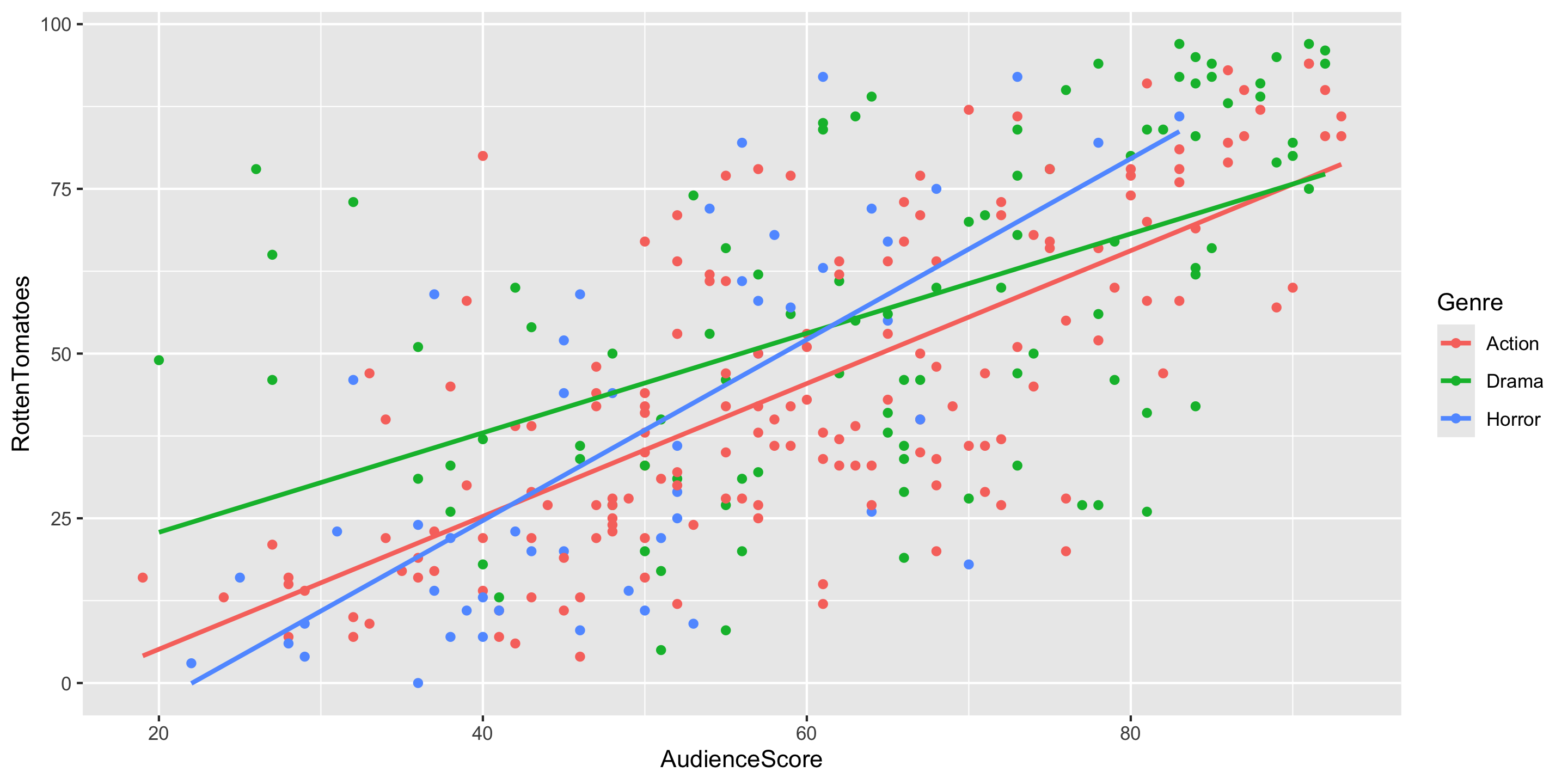
ggplot(data = movies2,
       mapping = aes(x = AudienceScore,
                     y = RottenTomatoes,
                     color = Genre)) +
  geom_point() +
  geom_smooth(method = "lm", se = FALSE)

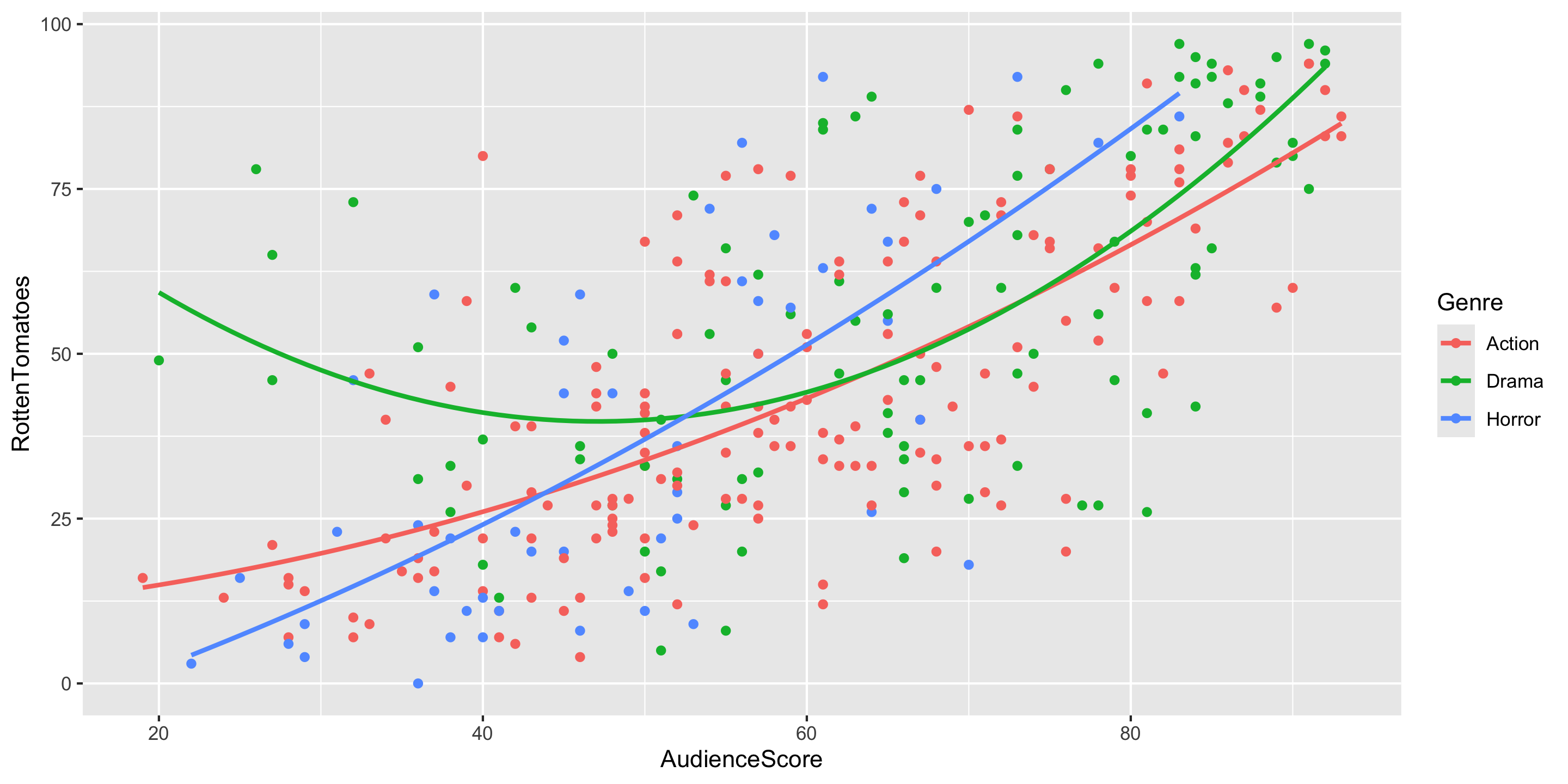
Adding a Curve to your Scatterplot

ggplot(data = movies2,
       mapping = aes(x = AudienceScore,
                     y = RottenTomatoes,
                     color = Genre)) +
  geom_point() +
  geom_smooth(method = "lm", se = FALSE, 
              formula = y ~ poly(x, degree = 2))

Fitting the New Model

mod2 <- lm(RottenTomatoes ~ poly(AudienceScore, degree = 2, raw = TRUE)*Genre, 
           data = movies2)
get_regression_table(mod2) 
# A tibble: 9 × 7
  term                    estimate std_error statistic p_value lower_ci upper_ci
  <chr>                      <dbl>     <dbl>     <dbl>   <dbl>    <dbl>    <dbl>
1 intercept                  9.92     14.9       0.668   0.505  -19.3     39.1  
2 poly(AudienceScore, de…    0.098     0.515     0.191   0.849   -0.916    1.11 
3 poly(AudienceScore, de…    0.008     0.004     1.79    0.075   -0.001    0.016
4 Genre: Drama              88.9      24.5       3.62    0       40.6    137.   
5 Genre: Horror            -23.8      31.1      -0.765   0.445  -84.9     37.3  
6 poly(AudienceScore, de…   -2.61      0.84     -3.11    0.002   -4.26    -0.956
7 poly(AudienceScore, de…    0.019     0.007     2.78    0.006    0.006    0.032
8 poly(AudienceScore, de…    0.574     1.22      0.469   0.639   -1.83     2.98 
9 poly(AudienceScore, de…   -0.001     0.012    -0.061   0.951   -0.024    0.022

Linear Regression & Curved Relationships

Form of the Model:

\[ \begin{align} y &= \beta_o + \beta_1 x_1 + \beta_2 x_2 + \cdots + \beta_p x_p + \epsilon \end{align} \]

But why is it called linear regression if the model also handles for curved relationship??

New topic: variable transformations in linear regression

Example: Truck Prices

Can we use the age of a truck to predict what its price should be?

Consider a random sample of 43 pickup trucks between 1994 and 2008:

pickups <- read_csv("http://andrewpbray.github.io/data/pickup.csv") %>%
  filter(year >= 1994)

head(pickups, n = 10)
# A tibble: 10 × 4
    year  miles price make 
   <dbl>  <dbl> <dbl> <chr>
 1  1994  89000  3800 GMC  
 2  1995 128500  3900 GMC  
 3  1995 131000  2500 Ford 
 4  1995 127000  4395 GMC  
 5  1995 176000  3250 Dodge
 6  1995 116455  5000 GMC  
 7  1996  84000  5900 Dodge
 8  1996  89000  2100 Ford 
 9  1996  79000  5350 Ford 
10  1996 151923  3450 GMC  

Exploratory data analysis

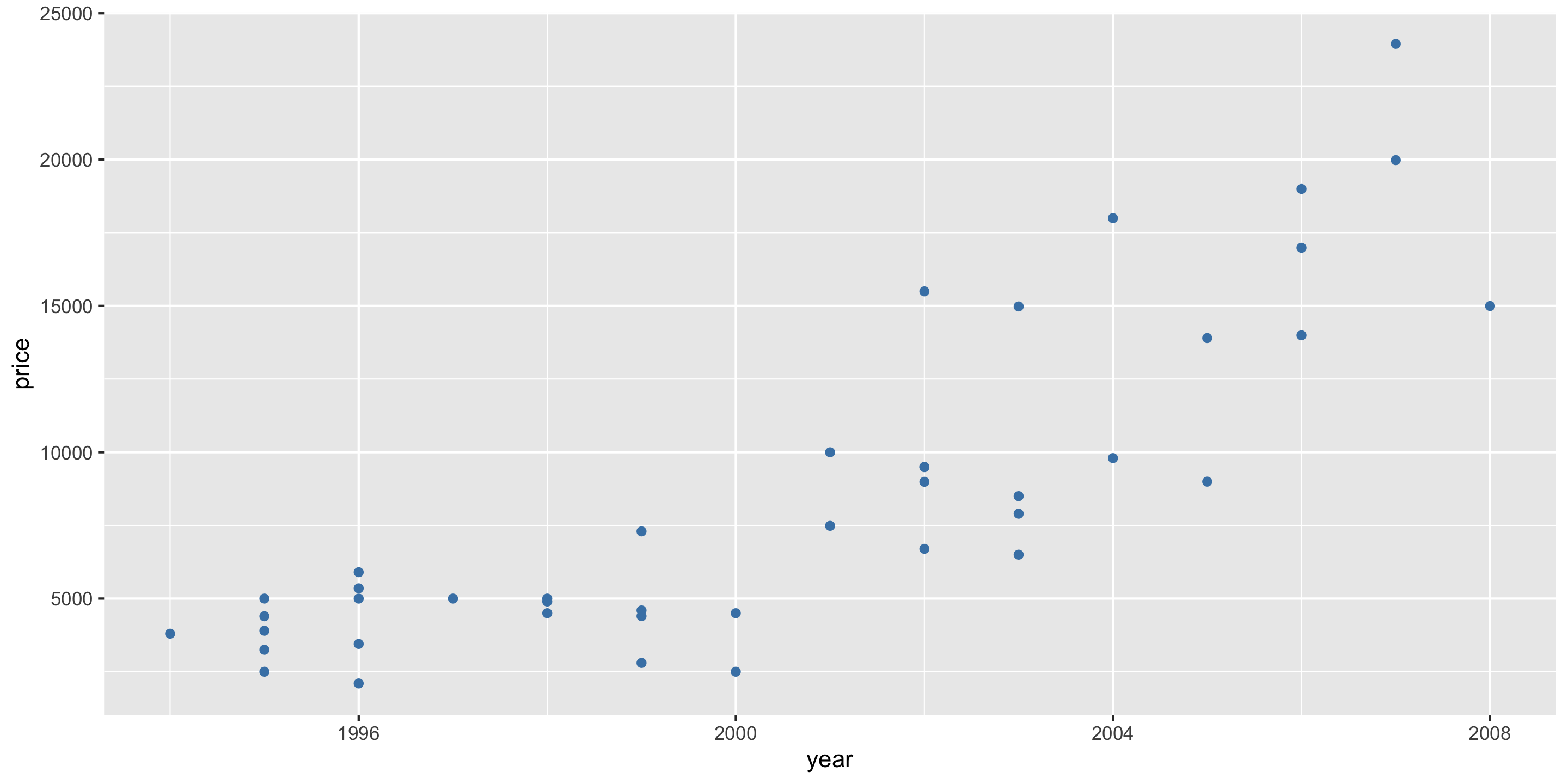
ggplot(pickups, aes(x = year, y = price)) +
  geom_point(col = "steelblue")

  • Modeling ideas?

Simple Linear Regression
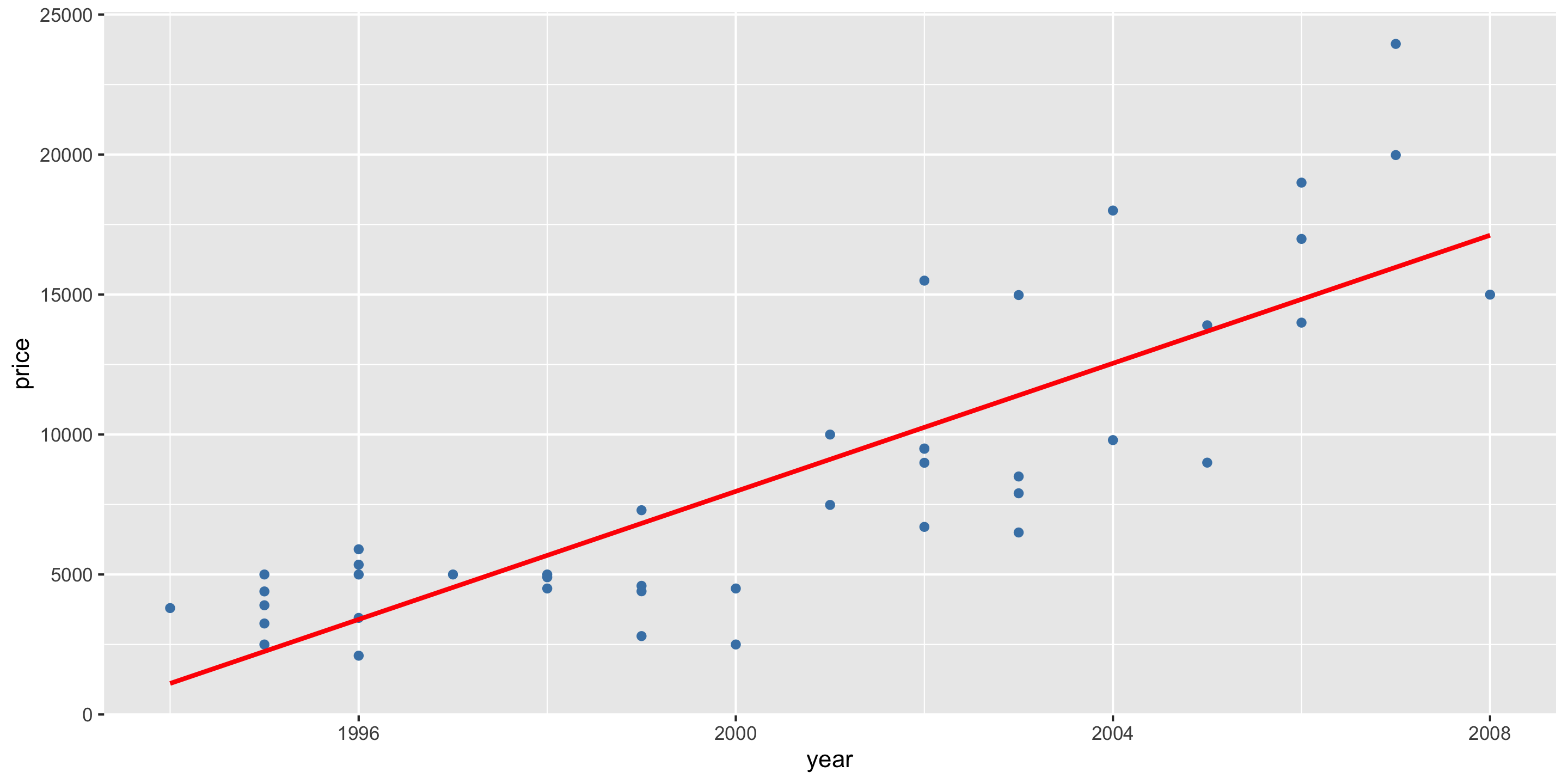
ggplot(pickups, aes(x = year, y = price)) +
  geom_point(color = "steelblue") + 
  geom_smooth(method = "lm", se = FALSE, color = "red")

Linear Regression with a 2nd degree polynomial
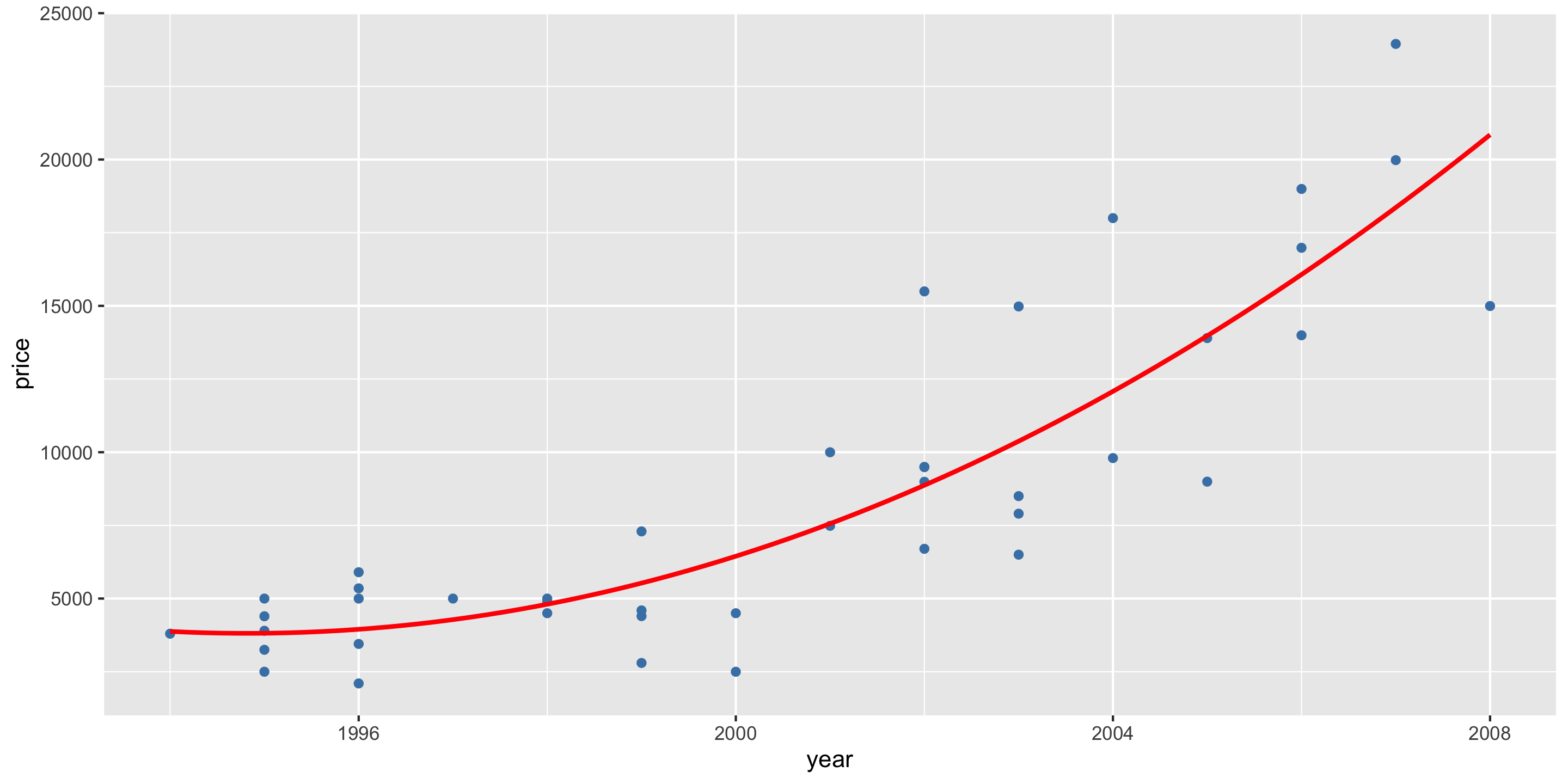
ggplot(pickups, aes(x = year, y = price)) +
  geom_point(color = "steelblue") + 
  geom_smooth(method = "lm", formula = y ~ poly(x, 2), se = FALSE, color = "red")

Simple Linear Model

library(moderndive)
truck_mod <- lm(price ~ year, data = pickups)
get_regression_table(truck_mod)
# A tibble: 2 × 7
  term       estimate std_error statistic p_value  lower_ci  upper_ci
  <chr>         <dbl>     <dbl>     <dbl>   <dbl>     <dbl>     <dbl>
1 intercept -2278766.   238326.     -9.56       0 -2760440. -1797092.
2 year          1143.      119.      9.60       0      903.     1384.

Diagnostics

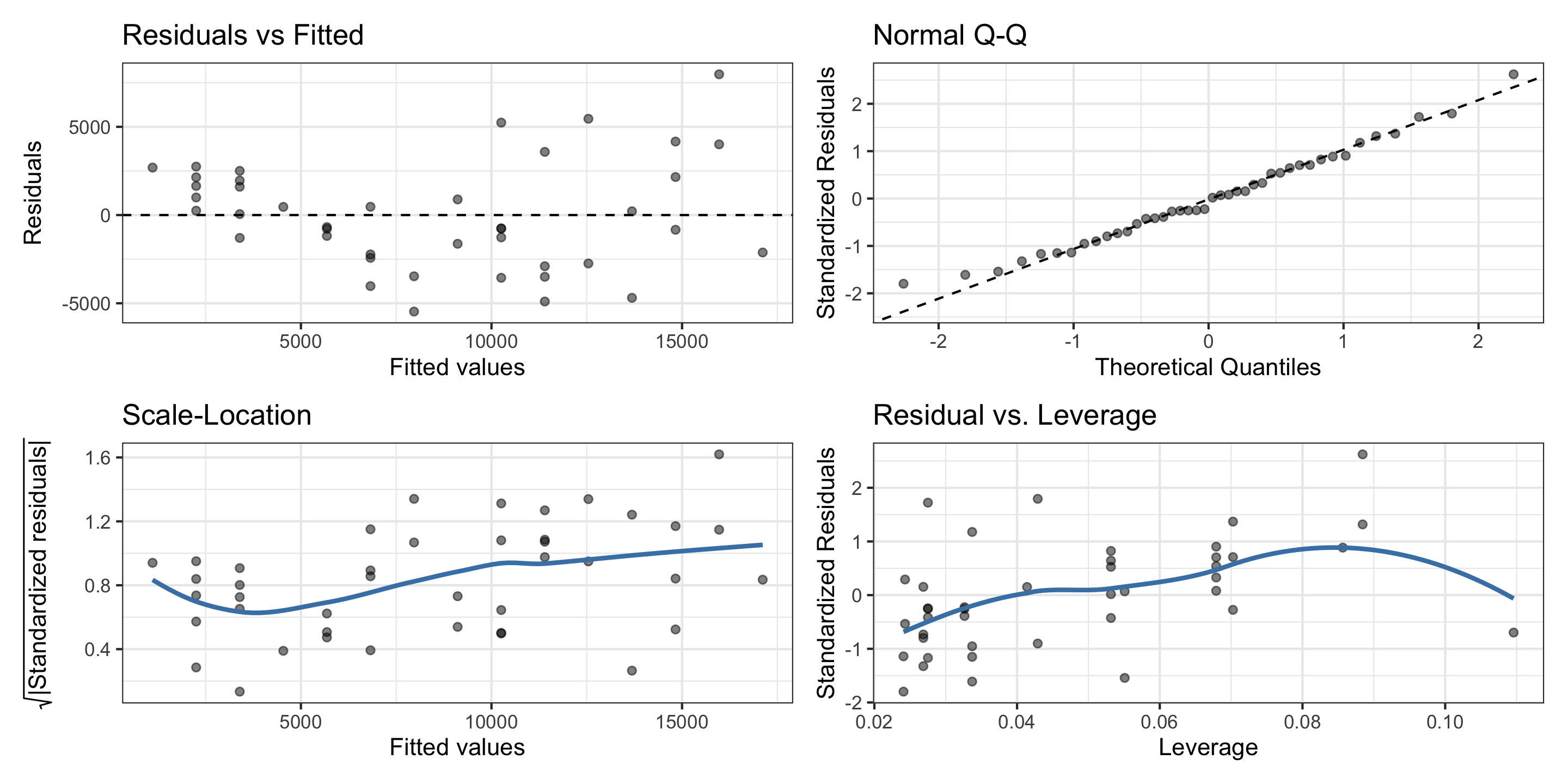
library(gglm)
gglm(truck_mod, theme = ggplot2::theme_bw())

  • Residuals appear normally distributed.

  • But data suggests a non-linear relationship.

  • There is evidence of non-constant variance in the residuals.

Linear Regression with 2nd degree polynomial

truck_poly_mod <- lm(price ~ poly(year, degree = 2, raw = TRUE),
                     data = pickups)
get_regression_table(truck_poly_mod)
# A tibble: 3 × 7
  term                    estimate std_error statistic p_value lower_ci upper_ci
  <chr>                      <dbl>     <dbl>     <dbl>   <dbl>    <dbl>    <dbl>
1 intercept                 3.90e8    1.18e8      3.32   0.002   1.52e8   6.28e8
2 poly(year, degree = 2,…  -3.91e5    1.17e5     -3.33   0.002  -6.28e5  -1.53e5
3 poly(year, degree = 2,…   9.80e1    2.94e1      3.34   0.002   3.86e1   1.57e2

Diagnostics

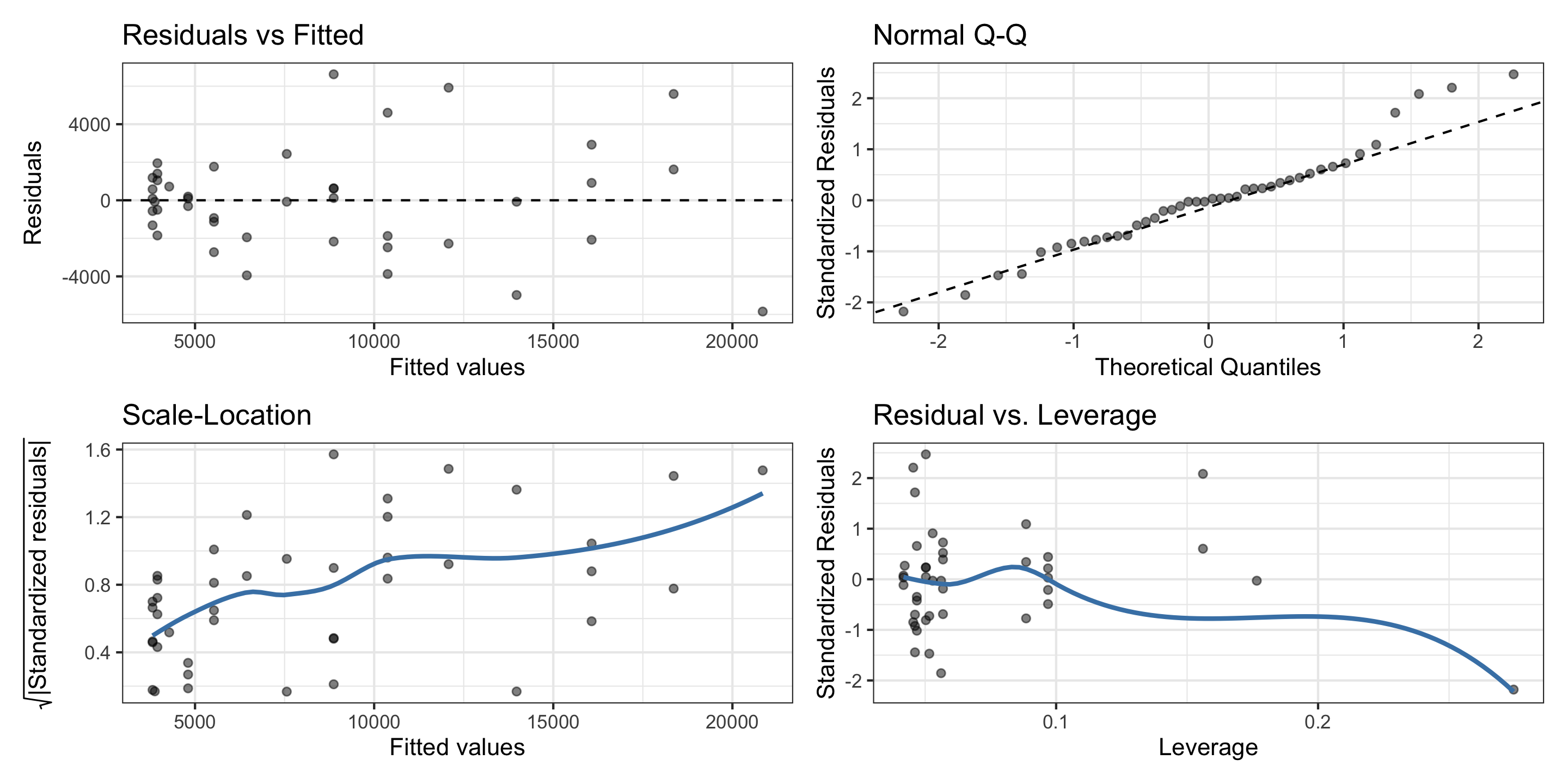
gglm(truck_poly_mod, theme = ggplot2::theme_bw())

  • Thoughts?
    • Still looks like we have non-equal variability of residuals?
    • And one high-leverage point.

Transformations

If the diagnostic plots look bad, try to transform variables by applying functions.

  • When the response variable spans multiple orders of magnitude, models are often non-linear and residuals often have non-constant variance.
  • These variables often benefit from a log-transformation: \(y_i = \log(y_i)\)
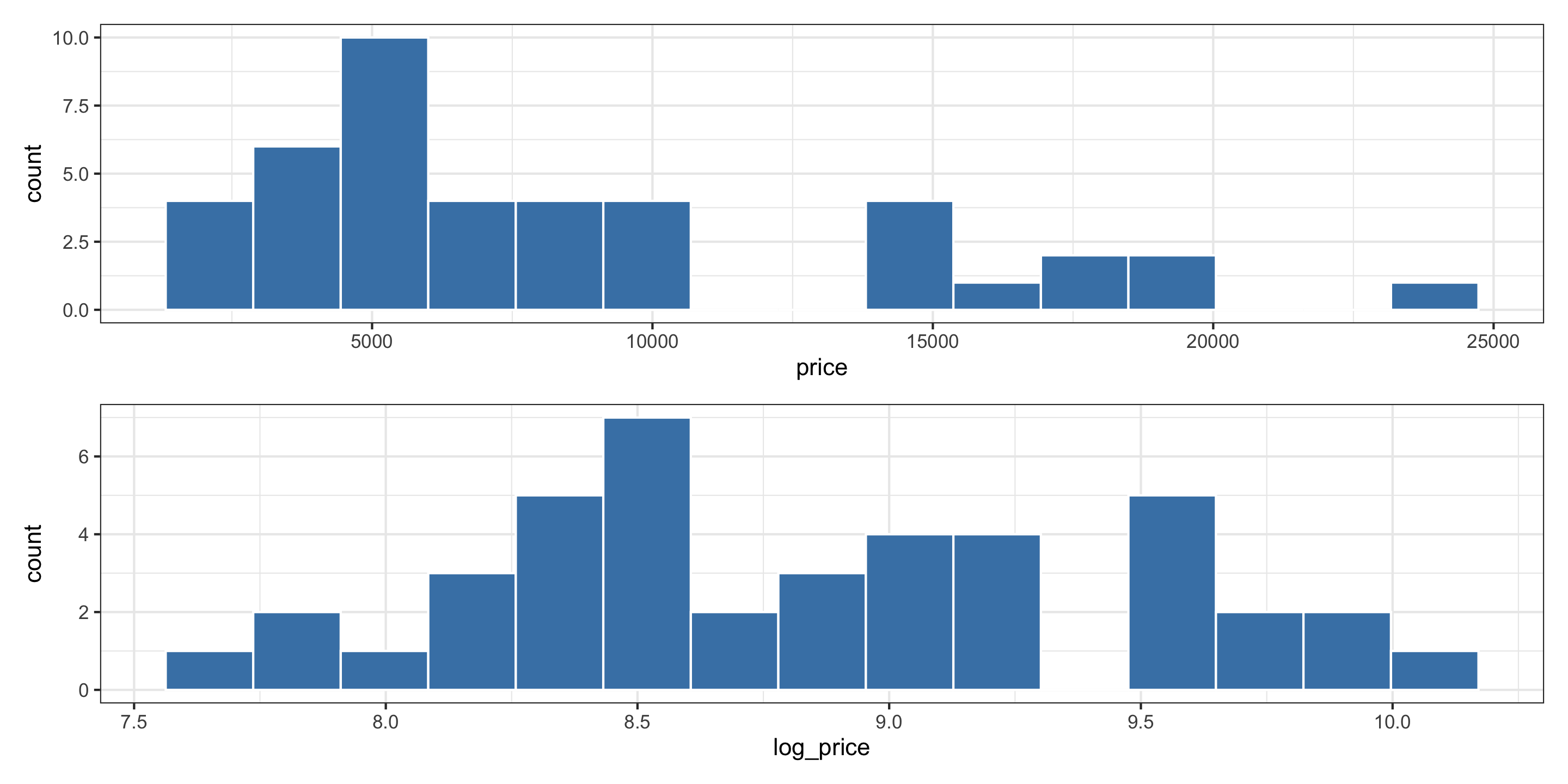
library(patchwork)
pickups$log_price <- log(pickups$price)

p1 <- ggplot(pickups, aes(x = price)) +
  geom_histogram(fill = "steelblue",
                 color = "white",
                 bins = 15)

p2 <- ggplot(pickups, aes(x = log_price)) +
  geom_histogram(fill = "steelblue",
                 color ="white", 
                 bins = 15)

p1 / p2

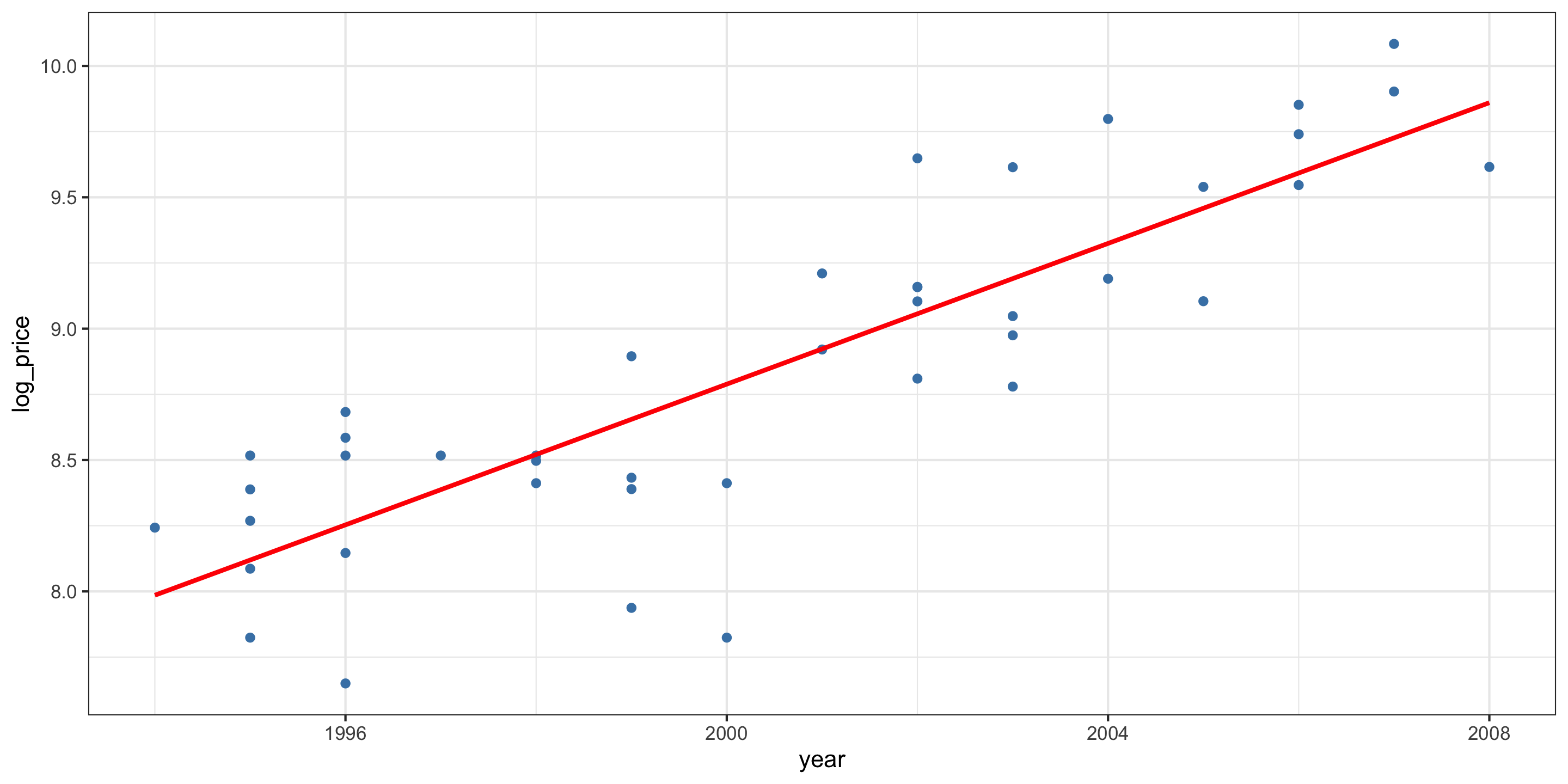
Log-transformed linear model

ggplot(pickups, aes(x = year, y = log_price)) +
  geom_point(col = "steelblue") +
  geom_smooth(method = "lm",
              se = FALSE,
              color = "red")

Fit the model in R:

truck_log_mod <- lm(log_price ~ year, data = pickups)
get_regression_table(truck_log_mod)
# A tibble: 2 × 7
  term      estimate std_error statistic p_value lower_ci upper_ci
  <chr>        <dbl>     <dbl>     <dbl>   <dbl>    <dbl>    <dbl>
1 intercept -259.       26.1       -9.91       0 -312.     -206.  
2 year         0.134     0.013     10.3        0    0.108     0.16

Diagnostics

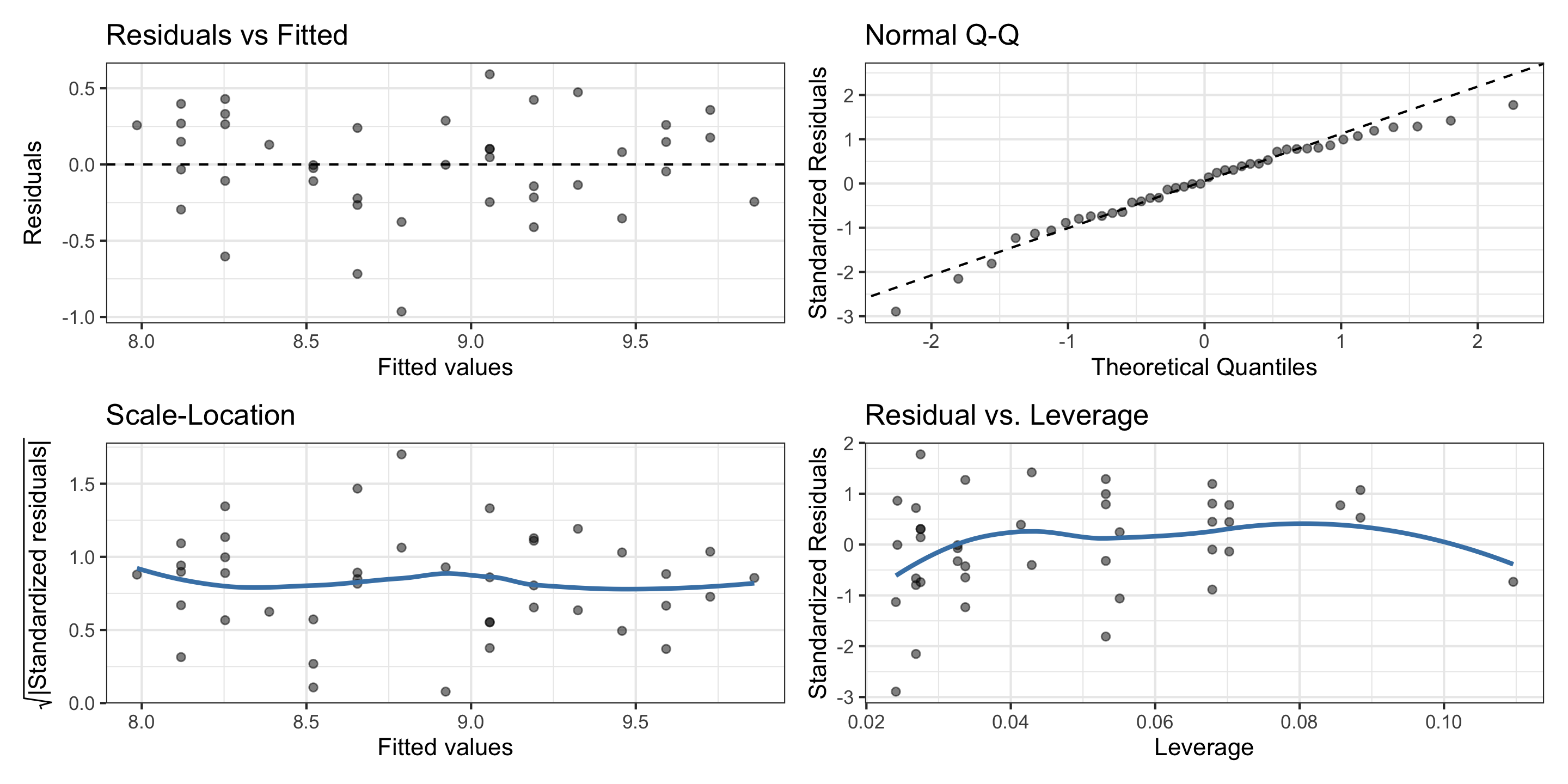
gglm(truck_log_mod, theme = ggplot2::theme_bw())

  • The residuals from this model appear less normal

  • But the quadratic trend is now less apparent.

  • There are no influential points

  • The variance has been stabilized

Coefficient interpretation for \(\hat\beta_1\)?

get_regression_table(truck_log_mod)
# A tibble: 2 × 7
  term      estimate std_error statistic p_value lower_ci upper_ci
  <chr>        <dbl>     <dbl>     <dbl>   <dbl>    <dbl>    <dbl>
1 intercept -259.       26.1       -9.91       0 -312.     -206.  
2 year         0.134     0.013     10.3        0    0.108     0.16
  • We expect the log price of a truck to go up by 0.134, on average, for each 1-year increase in its production date.

Prediction for transformed response

For linear regression, we know, for a value \(x_i\):

\[ \hat y_i = \mathbb{E}(y_i ~\vert~ X = x_i) \]

In English: our predicted value of \(Y\) is the expected value (average) of \(Y\) given that the value of our predictor \(X\) is \(x_i\).


So what happens if we log transform \(y\)?

Now, for a generic value of \(x_i\), the regression line represents:

\[ \mathbb{E}(\log (y_i) ~\vert~ X = x_i) \]

How to get \(\hat Y\)?

Prediction for transformed response

Transform the predictions?

\[ \hat y_i = \exp(\mathbb{E}(\log (y_i) ~\vert~ X = x_i)) \]

  • Close. But results in negative bias. Why?

\[ \exp(\mathbb{E}(\log (y_i) ~\vert~ X = x_i)) \neq \mathbb{E}(y_i ~\vert~ X = x_i) \]

“The exponentiation of the mean of the logs is not the mean of y”

In fact, since \(\exp(.)\) is convex, by Jensen’s inequality,

\[ \exp(\mathbb{E}(\log (y_i) ~\vert~ X = x_i)) \leq \mathbb{E}(y_i ~\vert~ X = x_i) \]

Prediction for transformed response

What’s this mean in practice?

  • Need a bias correction term when applying a transformation to the response variable in linear regression!

For log-transformations, this has been derived (under the assumption that normality and equal-variability of errors have been met):

\[ \mathbb{E}(y_i ~\vert~ X = x_i) = \exp\left(\mathbb{E}(\log(y_i) ~\vert~ X = x_i) + \frac{\sigma^2}{2}\right) \]

So our corrected prediction is:

\[ \hat y_i = \exp\left(\hat\beta_0 + \hat\beta_1 x_i + \frac{\hat\sigma^2}{2}\right) \]

Prediction for transformed response

In R, for \(x_i = 2001\):

Non-transformed prediction:

predict(truck_log_mod, newdata = data.frame(year = 2001))
     1 
8.9227 

Non-bias-corrected, transformed prediction:

exp(predict(truck_log_mod, newdata = data.frame(year = 2001)))
       1 
7500.315 

Bias-corrected, transformed prediction:

sigma <- summary(truck_log_mod)$sigma

exp(predict(truck_log_mod, newdata = data.frame(year = 2001)) + sigma^2 / 2)
       1 
7940.099 

Model Accuracy: returning to our three models

The \(R^2\) values for the log transformed and original models

data.frame(
  model = c("log transformed",
            "simple linear regression",
            "poly degree 2"),
  R_squared = c(summary(truck_log_mod)$r.sq,
                summary(truck_mod)$r.sq,
                summary(truck_poly_mod)$r.sq)
) %>%
  kable()
model R_squared
log transformed 0.7243830
simple linear regression 0.6972079
poly degree 2 0.7644604
  • The polynomial model has the best \(R^2\). But recall it didn’t meet all model assumptions!
  • The log-transformed model has better \(R^2\) than SLR, and met model assumptions.
  • Which is best?
    • Depends on your goals…

Transformations summary

  • If a linear model fit to the raw data leads to questionable residual plots, consider transformations.

    • Count data and prices often benefit from transformations.
    • The natural log and the square root are the most common, but you can use any transformation you like.
  • Transformations of \(y\) require bias-corrected predictions. Transformations of \(x\)’s do not.

  • Non-constant variance is a serious problem but it can sometimes be solved by transforming the response (\(y\)).

  • Transformations can also fix non-linearity

New topic: variable selection

Improving Model Accuracy

What do we do when the full model is inaccurate on test data (i.e. high test MSE)?

  • Remove redundant variables strongly correlated with each other

  • Remove spurious variables that aren’t linearly related with response

Two common methods of identifying extraneous predictors:

  1. Backwards Elimination:

    • Start with the full model, remove the variable with highest \(p\)-value, and refit. Continue to do so until all p-values are small, or accuracy ceases to improve.
  1. Forward Selection:

    • Start with the null model, create \(p\) many SLR models (one for each predictor), and select the one with best accuracy. Repeat with this new model, creating \(p-1\) two predictor models (one for each remaining predictor). Continue until accuracy ceases to improve.

Variable selection

  • There are lots of ways to do variable selection! Forward and backwards selection are just two intuitive ones.

  • We will spend more time in this class thinking about variable selection for models, but first…


Next time

  • Cross validation